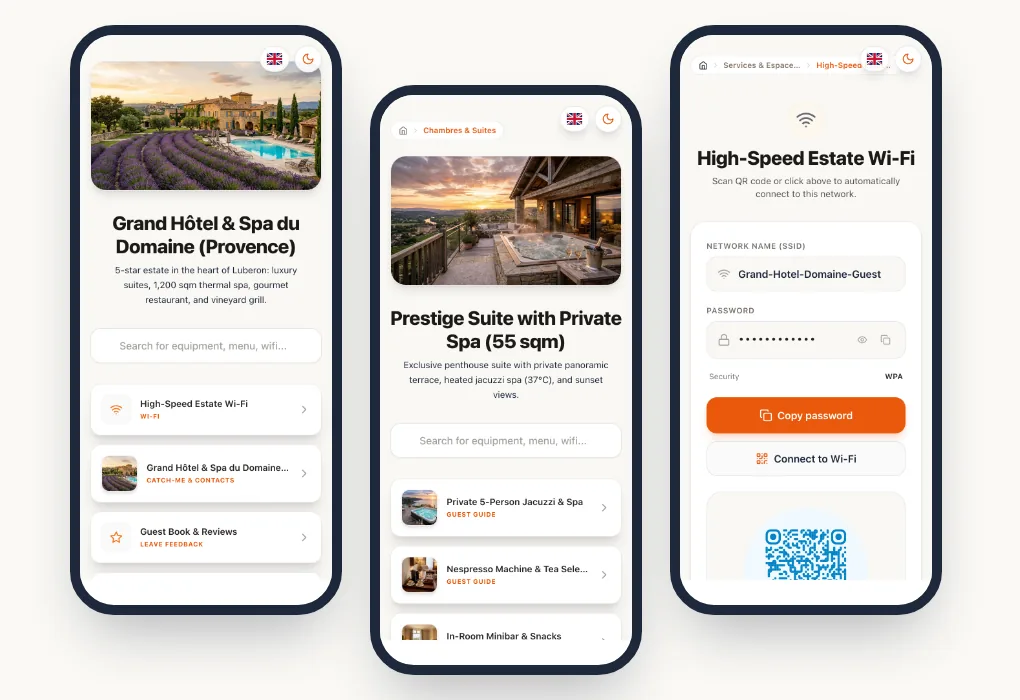
The welcome book in a plastic sleeve on the room desk has long been the norm. Yet it is rarely read, quickly out of date and expensive to reprint every time an opening time or price changes. Your guests, meanwhile, have their phone in hand as soon as they enter the room.
A digital guest directory puts all your hotel's information one scan away: Wi-Fi, services, opening hours, room equipment, the restaurant and the concierge. This guide covers what it should contain, what must stay posted in the room, and a template structure you can reuse.
In short
A good digital welcome guide opens by scanning a QR code in the room, reads in the guest's language and updates in seconds. It brings together practical information, hotel services and equipment guides, on your domain and in your brand colours.
What is a digital guest directory?
A digital guest directory, also called a digital welcome book or digital hotel guide, is a web page that guests open by scanning a QR code in their room or by following a link sent before arrival. It replaces the binder on the desk: the same information, but always up to date, translated into the guest's language and easy to read on a phone.
It is not an app. Guests have nothing to install and no account to create: the phone's camera is enough. That is what sets it apart from hotel apps, which few guests download for a two-night stay.
Is a guest directory mandatory?
In most countries, no law requires a guest directory as such. Some information, however, must be available in the room, and a digital directory does not remove the need to post it. In France, for example, every room must display fire safety instructions with a simple evacuation plan, usually on the back of the door, and phone call rates if the room has a landline.
A digital directory complements these notices: it can repeat the safety instructions in every language and remind guests of opening hours and check-out rules. But the fire safety notice must stay physically posted. Check the rules that apply in your country with your hotel association or local tourism office.
Why switch to a digital welcome guide?
- Information that is always right. A new breakfast time, a new spa treatment, a revised parking fee: you edit online, and every guest sees the correct information.
- Fewer calls to reception. Repetitive questions (Wi-Fi password, opening hours, how the air conditioning works) are answered in the room.
- A better welcome for international guests. Each guest reads the guide in their own language.
- Better-known services. The spa, bar, room service and activities are presented when guests can actually enjoy them.
- Less printing. QR codes are printed once; the content evolves without reprints.
Essential content
Practical information
This is what guests look for first, and it must be one tap away:
- Wi-Fi, with a button to copy the password or connect directly;
- opening hours: breakfast, reception, check-out, spa, pool, bar;
- contacts: reception, concierge, emergencies;
- access and parking: car park, shuttle, public transport.
Hotel services
The guide is also your best in-house showcase. Present each service with a photo, opening hours and how to book:
- the restaurant and bar, with their menus;
- room service, which guests can browse and order from their phone;
- the spa and wellness area, with its list of treatments;
- activities and excursions offered by the concierge.
Room equipment
Air conditioning, TV, safe, coffee machine, jacuzzi: each piece of equipment can have its own guide, with photos or a short video. A QR code placed discreetly next to the device opens the right guide directly.
Local recommendations
Partner restaurants, places to visit, markets, beaches: your recommendations are part of the experience and show your team's local knowledge.
Organising the guide by room
Not all rooms are alike. A suite with a private jacuzzi doesn't have the same equipment as a standard room. Ideally, structure the guide into spaces:
- a shared space for the whole hotel: Wi-Fi, opening hours, services, restaurant, recommendations;
- a space per room type: specific equipment, guides and room-specific instructions.
Each room then gets a QR code that opens exactly the information that concerns it, without drowning the guest in irrelevant guides.
Translating the guide for international guests
In a hotel, international guests often account for a large share of stays. A guide in one language forces reception to repeat the same explanations in several languages.
With a digital guide, guests choose their language and see all the content translated: services, opening hours, equipment guides and recommendations. At Pliyos, hotel plans include your original language plus 4 translation languages, chosen from more than 100, and the Resort / Groups plan has no language limit.
Translation is done by AI, but proofread important content, such as safety instructions and check-out conditions, in your main languages.
An experience in your image
The welcome guide extends your hotel's image. Two things make the difference:
- QR codes in your colours, with your logo in the centre, rather than an anonymous black square.
- Your own domain name. With a custom domain (CNAME), guests open for example
guide.your-hotel.comrather than a provider's address. The whole journey stays on your brand.
Where to place the QR codes?
- In the room: on the desk or bedside table, on an elegant stand or plaque.
- Next to equipment: by the air conditioning, safe or coffee machine, for the matching guide.
- At reception and in lifts: to present services and the restaurant.
- In the restaurant and bar: for the menu and allergens.
Take care of readability: a QR code of at least 2.5 to 3 cm, with strong contrast and a call to action such as "Scan to discover the hotel". Dynamic QR codes then let you change the content without touching the printed materials.
Collecting guest feedback
The guide is also the right place to invite guests to share their experience: a Google review QR code at the end of the stay, and a private feedback form for those who want to tell your team something directly. You handle issues before departure, and you make public reviews easy for all your guests.
Hotel guest directory template: a structure to reuse
Here is a simple structure, in the order guests look for information. It works for a 10-room hotel as well as a 200-room property.
- Welcome: a word from the team, a photo of the hotel, the reception number.
- Wi-Fi: network name and password, with a connect button.
- Opening hours: breakfast, reception, check-out, spa, pool, bar.
- Your room: equipment and guides (air conditioning, safe, TV, coffee machine).
- Hotel services: restaurant, room service, spa, laundry, concierge, with prices and how to book.
- Safety: fire instructions, emergency numbers, pharmacy and on-call doctor.
- Getting around: parking, shuttle, taxis, public transport.
- Around the hotel: restaurants, sights and activities recommended by the team.
- Departure: check-out time, key drop-off, luggage storage, late check-out.
- Your feedback: a link to Google reviews and a private feedback form.
In a digital directory, each part becomes a section reachable from the home screen. Parts 1 to 3 should be visible without scrolling.
How much does a digital welcome guide cost?
At Pliyos, the plans for hotels adapt to the size of your property:
- Boutique, €15 per month (excl. VAT): 3 QR codes, welcome guide and Wi-Fi sharing, ideal for guesthouses and small hotels;
- Hotel, €39 per month: 15 QR codes, services portal, restaurant menus and room service, custom domain;
- Enterprise, €79 per month: 50 QR codes and multi-user access for your team;
- Resort / Groups, €149 per month: unlimited QR codes, multi-property management and complete white-label.
Annual billing gives 2 months free, and the trial is free, without a credit card. Prices are also available in USD and GBP on the pricing page.
Mistakes to avoid
- Putting a PDF behind the QR code. It reads badly on a phone and can't be translated.
- Giving everything the same weight. Wi-Fi and opening hours must be visible immediately; details can wait.
- Forgetting to update. A wrong opening time frustrates more than missing information.
- Neglecting photos. A spa or restaurant presented without images is hardly tempting.
- Removing every printed reference. Keep a minimum at reception for guests who prefer paper.
For holiday rentals, our complete guide to digital welcome books covers self check-in and equipment guides in detail.
Frequently asked questions
Does a digital directory replace mandatory notices?
No. Fire safety instructions must stay posted in the room. The directory can repeat and translate them, but not replace them.
Do guests need to install an app?
No. The phone's camera is enough to scan the QR code, and the guide opens in the browser.
Can each room have different content?
Yes. Each room type can have its own space, with its equipment and guides, on top of the information shared across the hotel.
Can we use the hotel's domain name?
Yes, from the Hotel plan, with a custom domain (CNAME) such as guide.your-hotel.com.